
How to Use?
Save prompts in 3 steps
Save prompts
in 3 steps



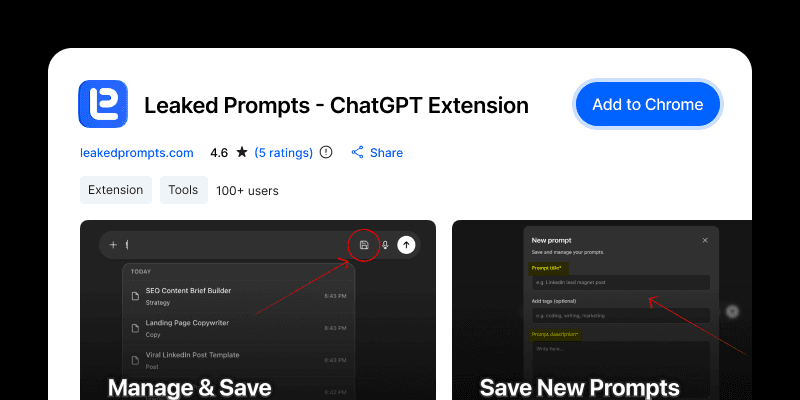
1. Install Leakedprompts
Get the extension from Chrome Web Store. Click "Add to Chrome"
1. Install Leakedprompts
Get the extension from Chrome Web Store. Click "Add to Chrome"
1. Install Leakedprompts
Get the extension from Chrome Web Store. Click "Add to Chrome"

2. Save Your Prompts
Write a prompt you love in ChatGPT. Click the save icon. Give it a name.
2. Save Your Prompts
Write a prompt you love in ChatGPT. Click the save icon. Give it a name.
2. Save Your Prompts
Write a prompt you love in ChatGPT. Click the save icon. Give it a name.
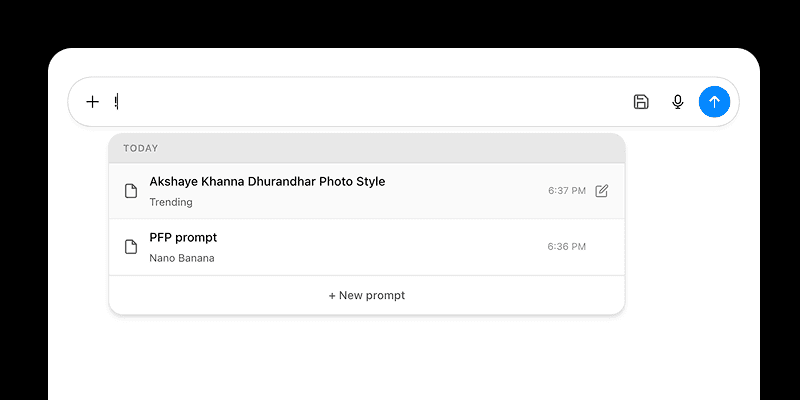
3. Access Anywhere
Type ! in ChatGPT. Pick your saved prompt. Use it instantly.
3. Access Anywhere
Type ! in ChatGPT. Pick your saved prompt. Use it instantly.
3. Access Anywhere
Type ! in ChatGPT. Pick your saved prompt. Use it instantly.
Common Questions
Is it free?
Yes. 100% free. No hidden costs. No premium plans. Free forever.
Is my data safe?
We collect zero data. Everything saves in your browser. Only you can see your prompts. Google auth coming soon for extra backup.
How do I save a prompts?
Write your prompt first. Click the save icon. Add a title. Add tags if you want. Next time, just type ! to see all your prompts. Pick one. Done.
What if I delete my browser data?
Your prompts will be deleted too. They live in your browser storage. Back them up or wait for Google auth feature.
Is it free?
Yes. 100% free. No hidden costs. No premium plans. Free forever.
Is my data safe?
We collect zero data. Everything saves in your browser. Only you can see your prompts. Google auth coming soon for extra backup.
How do I save a prompts?
Write your prompt first. Click the save icon. Add a title. Add tags if you want. Next time, just type ! to see all your prompts. Pick one. Done.
What if I delete my browser data?
Your prompts will be deleted too. They live in your browser storage. Back them up or wait for Google auth feature.
Is it free?
Yes. 100% free. No hidden costs. No premium plans. Free forever.
Is my data safe?
We collect zero data. Everything saves in your browser. Only you can see your prompts. Google auth coming soon for extra backup.
How do I save a prompts?
Write your prompt first. Click the save icon. Add a title. Add tags if you want. Next time, just type ! to see all your prompts. Pick one. Done.
What if I delete my browser data?
Your prompts will be deleted too. They live in your browser storage. Back them up or wait for Google auth feature.
